
Short answer: The Almanac is PVZ Fusion’s built-in book of every plant, fusion and zombie. Open it from the main menu to read a fusion’s formula and sun cost, a plant’s damage, toughness and range, or a zombie’s traits before you play. Since 3.6.1, a fusion’s entry stays hidden until you have fused that plant once — until then, its recipe shows.
What the Almanac is (and what it is not)
The Almanac is a reference book inside the game, not a shop and not a cheat screen. Reading it costs no sun, coins or progress. Its job is to answer three questions you will ask constantly: What does this plant do? What is it made from? What is that zombie about to do to my lawn?
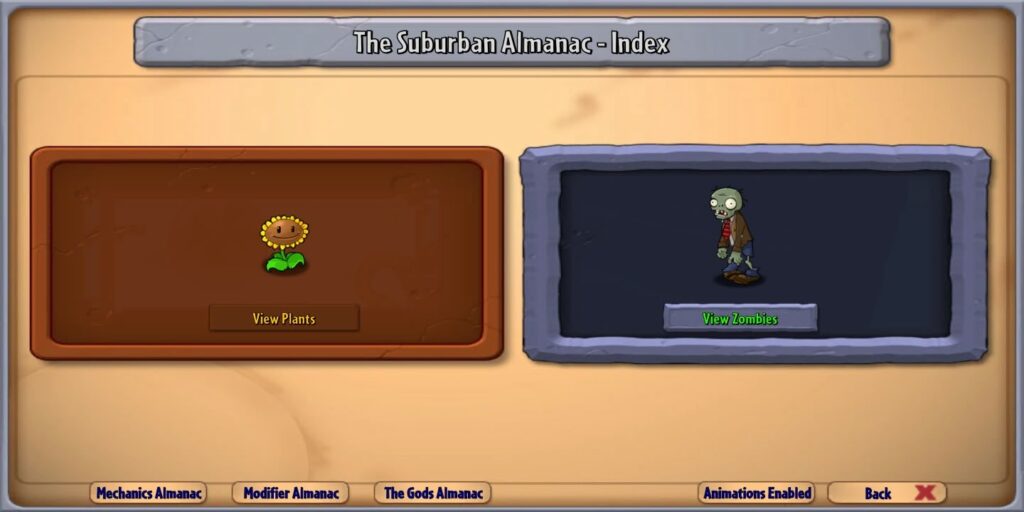
The book opens on The Suburban Almanac – Index: two panels, View Plants and View Zombies. Underneath sit three specialist books — the Mechanics Almanac (how the game’s systems and terms work), the Modifier Almanac (the modifiers the special modes use) and The Gods Almanac (entries for The Gods mode). Entries are grouped by type: base plants, fusion plants and zombies in the main book, mechanics and modifiers in their own books. Every entry follows the same layout.
What the Almanac does not do is rank anything — it gives raw numbers, not advice. For which fusions are worth building first, see our PVZ Fusion tier list and fusion recipes list.
How to read a plant or fusion entry
A base plant’s entry is simple: a one-line description, its sun cost and recharge time, plus a short flavour story. Cherry Bomb’s entry, for example, gives you 1,800 damage in a 3×3 area, 150 sun and a 50-second recharge — enough to judge whether it fits your seed selection.
Fusion entries carry more fields, because there is more to check before you spend sun on one:
| Field | What it tells you |
|---|---|
| Toughness | Damage the plant survives (most standard fusions: 300; walls far higher) |
| Damage | Per shot or hit, with firing interval (160×3/1.5s = three 160-damage shots every 1.5 seconds) |
| Targets | What it can hit: Ground, Water, flying, underground… |
| Range | One lane, 3 lanes, a 3×3 area, five directions, the tile in front |
| Special | The extra behaviour that makes the fusion worth building |
| Fusion Formula | The parent plants (e.g. Emberthree + Jalapeno) |
| Fusion Cost | The parents’ costs added up (e.g. 525 + 125 = 650 sun). Two prices means it is cheaper at night |
| System | Some fusions belong to a system (Cryo, Lumos, Magnetic…) with its own buffs |
Two reading tips worth memorising:
- Day and night prices are real. Mushroom ingredients cost less at night, so a mushroom fusion’s entry prints both totals — Charm-shroom: 400 sun by day, 175 at night. If a fusion looks too expensive for a night level, check its night price first.
- Order can matter. Most pairs fuse either way, but a few only work in the order shown. If two plants refuse to merge, check the formula before assuming the recipe is wrong — Icewood (Torchwood + Ice-shroom) is a known one-way recipe.
Odyssey fusions add two extra lines: Usage Conditions (“Only in Odyssey modes” when the plant cannot be used elsewhere) and Odyssey Buffs — Entry 1 and Entry 2, the two upgrade effects that fusion can gain in Odyssey: Survival and Odyssey: Last Stand, picked on the buff selection panel.
Zombie entries use a smaller set of fields: Toughness, Damage, and Special / Traits, plus flavour text — still enough to plan a counter. Pole Vaulting Zombie’s entry (720 toughness) states that it jumps the first plant it meets and can be blocked by Tall-nuts, so a tall wall, not a normal Wall-nut, is the answer. For the whole roster outside the game, browse our plants and zombies pages.
How entries unlock — and why some pages look empty
This is the part that confuses new players, because three different locks look identical in the book:
- Base plants unlock through Adventure. Each Adventure level you complete hands you something new — Cherry Bomb after the early levels, Wall-nut soon after, Ice-shroom much later, at stage 15.
- A fusion’s full entry unlocks when you fuse it. Since 3.6.1, a plant you have never fused shows only its recipe; the full entry — stats, special behaviour, story — appears after you have built it once. The recipe itself is never hidden: the book always tells you how to make something. If reading ahead matters more than discovering entries yourself, the game’s own Settings screen includes an “Unlock all Almanac Entries” button (visible at the bottom of the settings panel in the screenshot hosted on this site).
- Super (Advanced) recipes unlock through the Fusion Challenge. Three-plant Super fusions become usable everywhere only after you clear that fusion’s own Fusion Challenge stage — stage 1 for Cherry-bomber, stage 3 for Charm-shroom. Until then the fusion is locked outside its challenge, no matter what the Almanac shows.
The shortcut, if you want it: the same Settings panel carries buttons that complete all of Adventure and all levels at once. Completing Adventure hands you every Adventure unlock together — Cherry Bomb included — so if you only want to browse a complete Almanac or test fusions, everything can be opened from Settings instead of through the campaign. It rewrites your save’s progress, so treat it as a sandbox switch, not as playing the game.
Using the Almanac before a level: a five-minute routine
The Almanac earns its keep before a wave starts, not during one:
- Name your target fusion first. Decide what you want — a lane holder, a splash attacker, a wall upgrade — so you check a specific recipe instead of browsing.
- Read its formula and total cost. Your Sunflowers have to fund the parents first, then the fusion. If the total arrives too late for the first huge wave, pick a cheaper stepping-stone fusion from the same family.
- Check Targets and Range against the level. Pool levels need answers for water zombies; night levels change which mushrooms are cheap. A fusion whose Targets line says “Ground” will not save a pool lane.
- Read one zombie entry — the newest one. After a level where a zombie surprised you, read its entry while the loss is fresh. Traits lines read like counter instructions: Mecha-nut Zombie’s entry warns that it crushes plants with 1,000 toughness or less, switches lanes on impact, and is countered by Umbrella-leaf fusions. That one page changes your next attempt.
- Note the recipe, then close the book. Sun spent on a wrong guess mid-wave is gone for good. Five minutes in the Almanac is the cheap version of that mistake.
When the in-game book is not enough
Its one real limit is scope: your book, your save, inside the game only. Two community tools fill the gaps:
- The community wiki (wiki.gg) reproduces entries in the same format — its Phoenix Threepeater entry shows the full field set, including both Odyssey Buffs — plus obtaining routes the game never prints. Use it for fusions you have not unlocked yet.
- Carrot’s browser Almanac on itch.io is an unofficial replica of the in-game book (plants, skins and modifiers, up to 3.6.1). Its best trick: double-click a seed packet to see that plant’s fusions — the fastest way to explore fusion family trees on a second screen.
Almanac questions players actually ask
Why is a fusion’s Almanac page mostly empty?
Because you have not fused it yet. Since 3.6.1, unfused plants show their recipe only; the full entry unlocks the first time you build it.
How do I unlock a Super fusion’s recipe?
Beat that fusion’s own stage in the Fusion Challenge — Cherry-bomber at stage 1, Charm-shroom at stage 3, Diamond Leaf at stage 10. After the clear, the recipe works in every mode.
Why does the same fusion show two different sun costs?
The entry prints a day and a night total when they differ. Mushroom ingredients are cheaper at night, so mushroom fusions cost less after dark — Charm-shroom is 400 sun by day, 175 at night.
What are the “Entry 1” and “Entry 2” buffs on Odyssey fusions?
They are the two Odyssey Buffs that fusion can gain in Odyssey: Survival and Odyssey: Last Stand, activated from the buff selection panel. The Almanac lists what each does — for Phoenix Threepeater, Entry 1 strengthens its flame effect and Entry 2 makes its projectiles pierce infinitely.